MCP Tools
The MCP Tools page shows how Metatate exposes governed data context to agents and machine consumers. Metatate provides Snowflake-native wrappers and a Snowflake-managed MCP server so agent clients can use the interface that fits their runtime.
The guided setup paths today are:
- Snowflake Intelligence for Snowflake-native agents using the
core.agent_*adapter wrappers - Claude Code plugin for developer workflows using the Snowflake-managed
core.metatate_mcpserver through OAuth - Cortex Code plugin for Snowflake-native developer workflows using the same managed MCP server with role-restricted PAT headers
- Custom MCP clients for agent frameworks and services that can connect to HTTP MCP servers with Snowflake OAuth
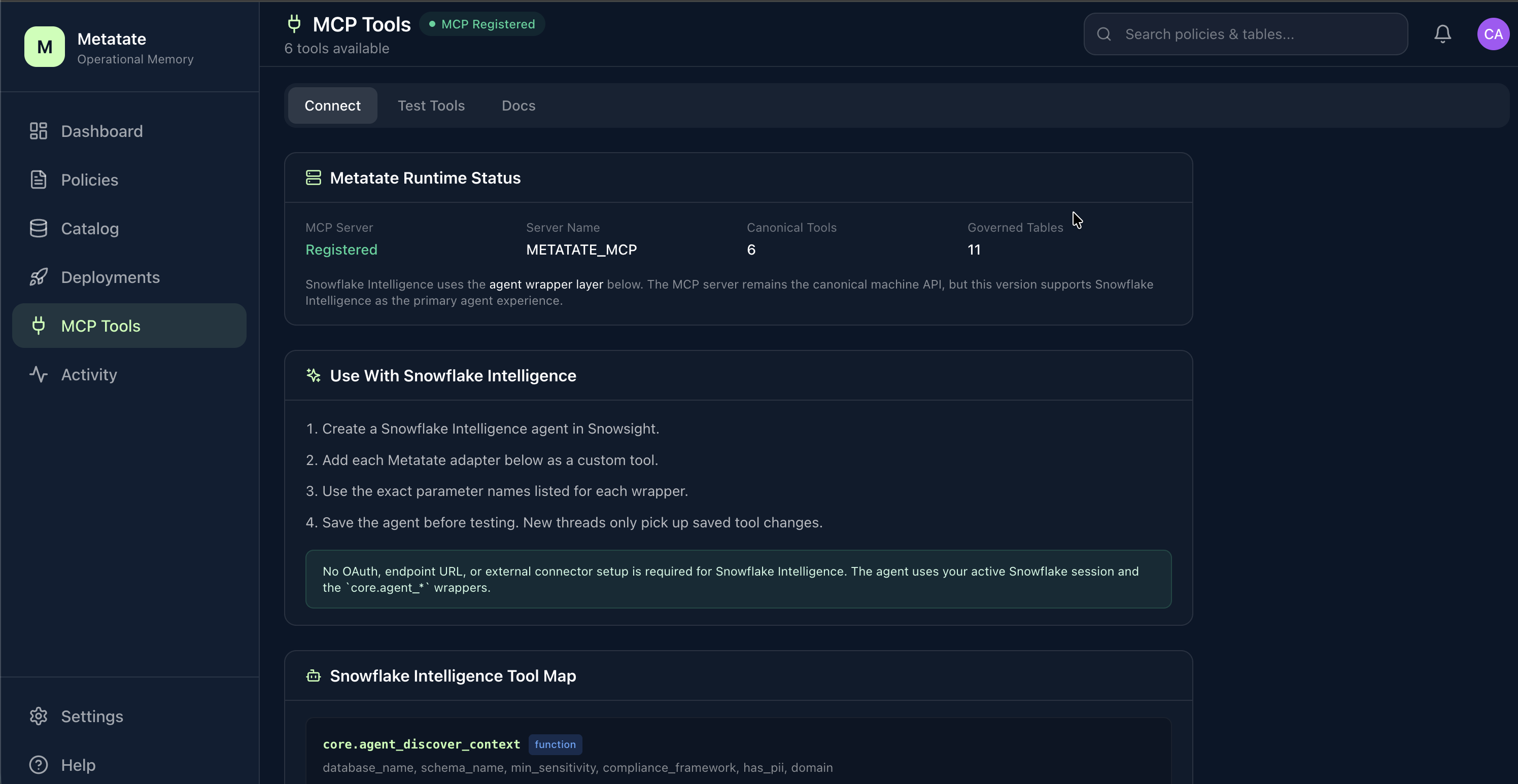
What the page shows
The page is organized into three tabs:
- Connect -- runtime status, integration choice, and quick starts
- Test Tools -- direct execution of the canonical Metatate tools using your current Snowflake session
- Reference -- interface map, wrapper parameters, canonical tool reference, prompts, and troubleshooting
Connect Tab
The Connect tab shows:
- current canonical MCP server registration status
- Snowflake Intelligence, Claude Code, Cortex Code, and custom MCP client guidance
- high-level authentication requirements for each interface
- starter prompts that use environment-specific governed assets instead of fixed sample tables
Recommended first tests
Attach core.agent_get_decision_context(table_name STRING) to a Snowflake Intelligence agent, then ask:
What decision context applies to
<fully-qualified-governed-table>?
That validates the Intelligence-to-Metatate path with the fewest moving parts.
For Claude Code, install the plugin and authenticate the metatate MCP server, then run:
/metatate:discover-context
Ask Metatate to show governed assets available in your environment:
Show governed assets I can inspect. If needed, ask me for a database, schema, domain, sensitivity level, or compliance tag.
For Cortex Code, export a role-restricted PAT in the same shell, start the MCP server, and run the same Metatate discovery command:
export METATATE_CORTEX_PAT='<snowflake-pat-secret>'
cortex mcp start
Why Snowflake Intelligence uses wrappers
Metatate's canonical SQL tools accept a single VARIANT request payload. Snowflake Intelligence custom tools bind named scalar parameters. Those two interfaces do not line up cleanly, so Metatate provides an adapter layer:
- canonical layer:
core.discover_context(input VARIANT)and peers - Intelligence layer:
core.agent_*wrappers with scalar parameters
The wrapper layer preserves the canonical machine contract while making the tools usable from the Snowflake agent builder UI.
Why developer plugins use the canonical MCP server
Claude Code and Cortex Code can speak to remote MCP servers. The Metatate plugins add slash commands and guidance, while the MCP registration connects the client directly to Snowflake's managed MCP endpoint:
https://<account-url>/api/v2/databases/METATATE_APP/schemas/CORE/mcp-servers/METATATE_MCP
This path does not use a Metatate-hosted gateway. Claude Code uses Snowflake OAuth and must request the intended Snowflake role with:
session:role:<snowflake-role>
That role must also be allowed and preauthorized on the Snowflake OAuth security integration.
Cortex Code uses a role-restricted Snowflake PAT and sends the intended role with X-Snowflake-Role. The PAT role restriction and the MCP header should match.
Custom MCP clients
Agent frameworks, services, and other MCP-compatible clients can use the same Snowflake-managed MCP endpoint when they support HTTP MCP and the required Snowflake OAuth flow. Client-specific setup depends on how that client handles OAuth client credentials, redirect URIs, token storage, and HTTP MCP transport.
Supported Snowflake Intelligence wrappers
| Wrapper | Type | Primary use |
|---|---|---|
core.agent_discover_context | Function | Discover governed tables with scalar filters |
core.agent_get_decision_context | Function | Retrieve governance context for a table |
core.agent_inspect_data_meaning | Function | Inspect meaning, classification, and masking |
core.agent_inspect_governance_rules | Function | Inspect usage, validation, and transfer rules |
core.agent_authorize_use | Procedure | Authorization wrapper for Snowflake Intelligence agents |
core.agent_validate_query_context | Procedure | Validate SQL against governance rules |
core.agent_explain_why | Procedure | Explain a logged governance decision |
Test Tools Tab
Test the canonical tools directly from the Metatate UI without configuring a Snowflake Intelligence agent.
Available canonical tools:
| Tool | Description |
|---|---|
discover_context | List governed tables and metadata |
get_decision_context | Get the full decision context for a table |
inspect_data_meaning | Inspect classification, masking, and meaning |
inspect_governance_rules | Inspect usage, validation, and transfer rules |
authorize_use | Evaluate whether a proposed data use is allowed |
validate_query_context | Check a SQL query against governance rules |
explain_why | Retrieve the reasoning behind a previous decision |
Reference Tab
The Reference tab explains:
- which interface to use for Snowflake Intelligence, Claude Code, Cortex Code, custom MCP clients, and in-app testing
- how the wrapper layer maps onto the canonical tool layer
- how the Claude Code plugin uses the canonical MCP server
- how the Cortex Code plugin uses the canonical MCP server with role-restricted PAT headers
- which
core.agent_*wrapper to attach for each user intent - the exact parameter names to use in Snowflake Intelligence custom tools
- common failure modes such as accidentally wiring the raw
VARIANT-based canonical tools into a Snowflake Intelligence agent, omittingsession:role:<role>from Claude Code OAuth setup, or starting Cortex Code withoutMETATATE_CORTEX_PAT
For authorize_use, the page now includes:
- a hybrid structured form with table, role, column, destination, and jurisdiction inputs
- an AI-assisted natural-language preparation flow that builds a structured request
- guided decision rendering with summary, matched instructions, conditions, prohibitions, obligations, next actions, and raw JSON
Current scope
This version provides guided product walkthroughs for Snowflake Intelligence, Claude Code, and Cortex Code, plus the Snowflake-managed MCP contract that custom MCP clients can use when their runtime supports HTTP MCP and Snowflake OAuth. Cursor, Claude Desktop extension packaging, and additional client-specific walkthroughs remain outside the supported product walkthroughs for now.